|
|
|
|||
|
How to
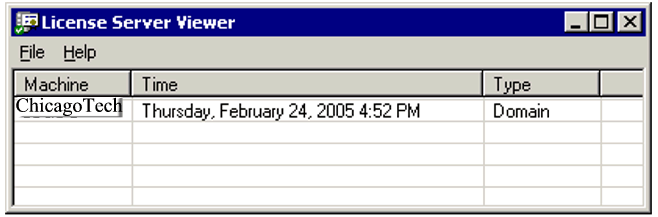
use the Terminal Services Viewer Case Study: one of our clients received this message when they accessed the TS using RDC: "The client could not establish a connection to the remote computer". When we checked the status of the TS License using Terminal License Tools, it did not list any TS licenses. and we could not install the TS licenses because of "Windows cannot connect to a licensing server" Using Lsviewer.exe which comes with windows 2000 Resources Kit, we found that there was not a licensing sever in their domain. The reason is that they had to remove their original Domain Controller two month ago. In most cases, the licensing server is installed on the first DC. Therefore, they lost the licensing server and we need to re-install it. After installed the licensing server, lsveiwer displayd the licensiing server as showing below. Then can we install the TS licenses and run RDC to access the TS server.
Related Topics Troubleshooting Terminal Services Issues Troubleshooting Remote Desktop Connection Issues Previous Page Next Page |
|
|
This web is provided "AS IS" with no warranties.
Copyright © 2002-2018
ChicagoTech.net,
All rights reserved. Unauthorized reproduction forbidden.