|
|
|
|||
|
Home | Troubleshooting | Quick Setup | Cisco How to | Data Recovery | Forums | Blog | IT Exam Practice | Services | About Us | Chicagotech MVP | Search | Contact Us | |
|
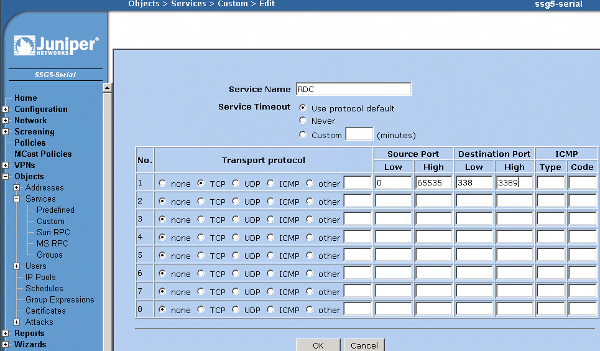
How to forward ports in Juniper SSG - Creating a custom object
1. Login SSG. 2. Navigate Object>Services>Custom. 3. Check the protocol, and type other information such as Service name and port #. Note: the Source Port should be between 0 to 65535. 4. Click OK to save it.
Post your questions, comments, feedbacks and suggestions Related Topics How to configure QoS on Juniper
SSG How to create an address object in Juniper SSG How to create a object group in Juniper SSG How to forward ports in Juniper SSG Juniper SSG Initial Configuration
|
|
|
This web is provided "AS IS" with no warranties.
Copyright © 2002-2018
ChicagoTech.net,
All rights reserved. Unauthorized reproduction forbidden.