|
|
|
|||
|
Configure Aging time on the DNS server Configure Aging time in the DNS zone Properties
Configure Aging time on the DNS server
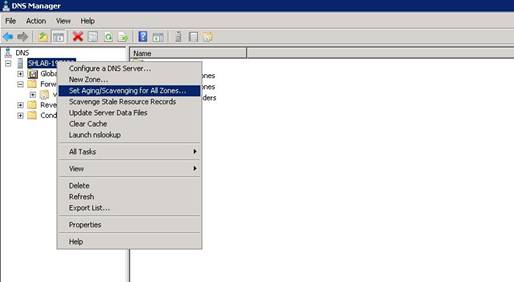
1. Right-click the DNS server and select “Set Aging/Scavenging for All Zones”
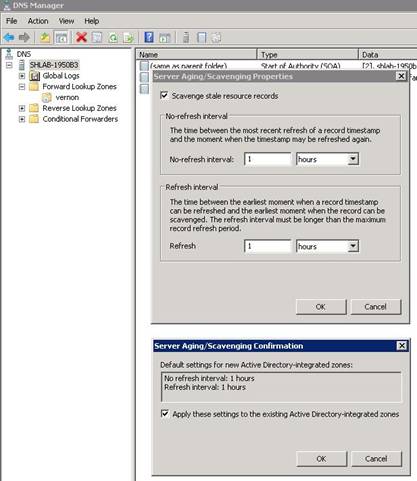
DNS Server 2. In the “Server Aging/Scavenging Properties” window, check the “Scavenge stale resource records” option and modify the Refresh and NoRefresh interval value. Click “OK”, a new window pops up, check the “Apply these settings to the existing Active Directory-integrated zones” option, click “OK” and save the changes.
Configure Aging
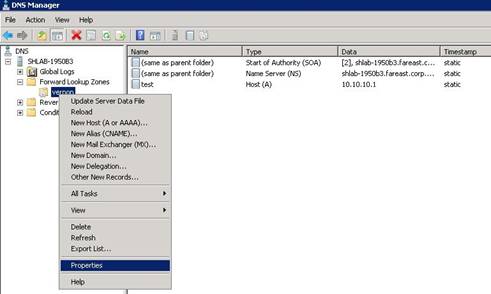
time in the DNS zone Properties. 1. Right-click the DNS zone and select “Properties”.
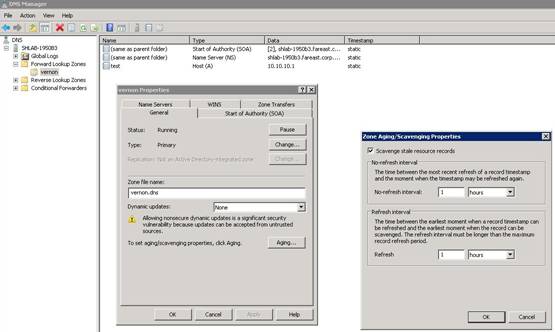
DNS Zone 2. In the “properties” windows, click the “Aging” button. In the “Zone Aging/Scavenging Properties” window, check the “Scavenging stale resource records” option and modify the Refresh/NoRefresh interval value again.
Post your questions, comments, feedbacks and suggestions Related Topics
|
|
|
This web is provided "AS IS" with no warranties.
Copyright © 2002-2018
ChicagoTech.net,
All rights reserved. Unauthorized reproduction forbidden.