|
|
|
|||
|
Home | Troubleshooting | Quick Setup | Cisco How to | Data Recovery | Forums | Blog | IT Exam Practice | Services | About Us | Chicagotech MVP | Search | Contact Us | |
|
How to switch Combatable View in IE 8
In some cases, you may want to switch Combatable View in IE 8. For example, the Virtual Server 2005 may not work in IE 8 unless you switch to Combatable View.
The Combatable View button located in the navigation bar just to the right of the address bar (next to the refresh button) controls the Compatibility View feature. To switch IE to Combatable View, click on the Icon.
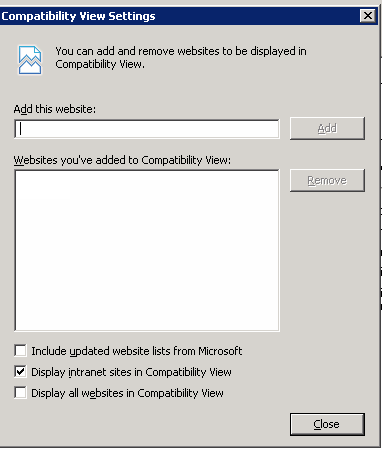
To configure Combatable View Settings, click on Tools tab. Type the computer name and click Add to add the website to the Combatable View. in most cases, you just select Display intranet sites in Combatable View.
Post your questions, comments, feedbacks and suggestions Related Topics
|
|
|
This web is provided "AS IS" with no warranties.
Copyright © 2002-2018
ChicagoTech.net,
All rights reserved. Unauthorized reproduction forbidden.