|
|
|
|||
|
Home | Troubleshooting | Quick Setup | Cisco How to | Data Recovery | Forums | Blog | IT Exam Practice | Services | About Us | Chicagotech MVP | Search | Contact Us | |
|
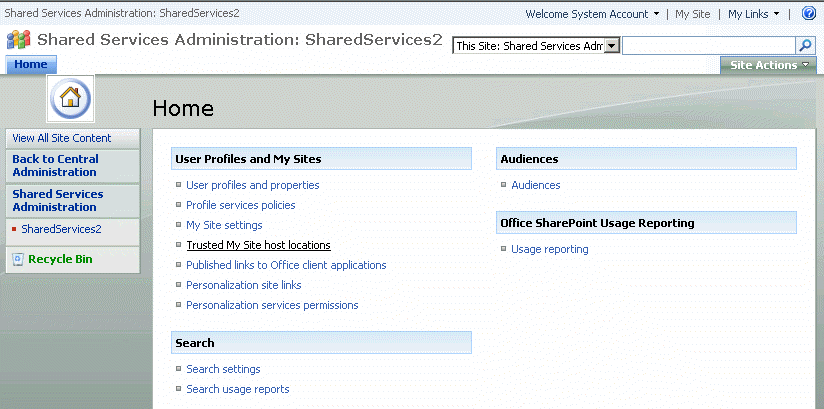
How to Edit SharePoint User Profile in SSP 1. Open SharePoint Center Administration and click ShareService2 in the left panel. 2. Under User Profiles and My Sites, click on the link labeled "User profiles and properties"
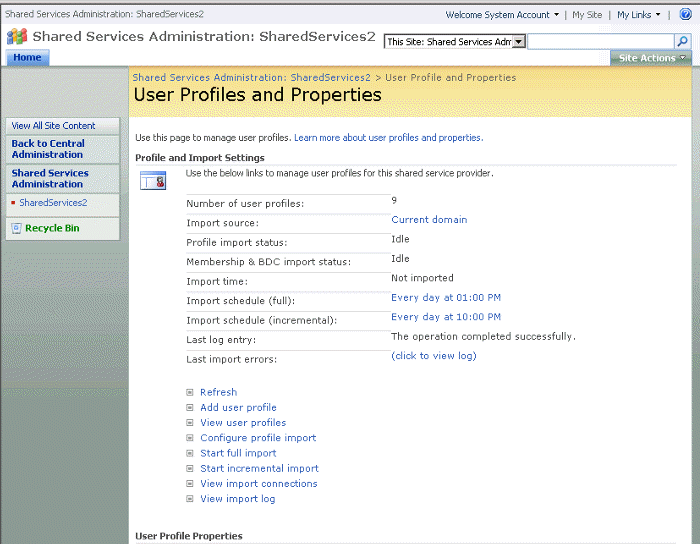
3. On the User Profiles and Properties page click on "View user profile".
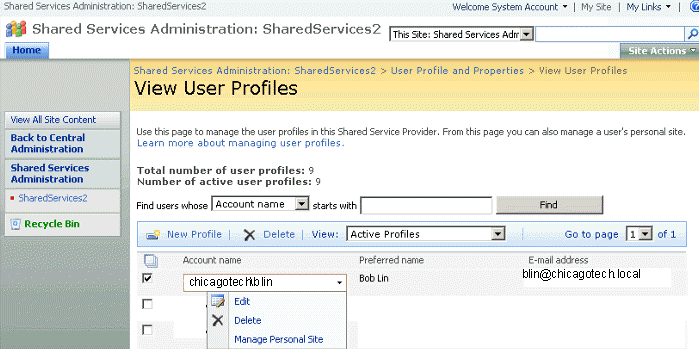
4. click on the Account name you want to edit and select edit.
5. In our example, the user's work email is blin@chicagotech.local which should be blin@chicagotech.net. Change it accordingly and click "Save and close" to save the settings. Post your questions, comments, feedbacks and suggestions Related Topics |
|
|
This web is provided "AS IS" with no warranties.
Copyright © 2002-2018
ChicagoTech.net,
All rights reserved. Unauthorized reproduction forbidden.