|
|
|
|||
|
Home | Troubleshooting | Quick Setup | Cisco How to | Data Recovery | Forums | Blog | IT Exam Practice | Services | About Us | Chicagotech MVP | Search | Contact Us | |
|
How to enable Anonymous Users in SharePoint
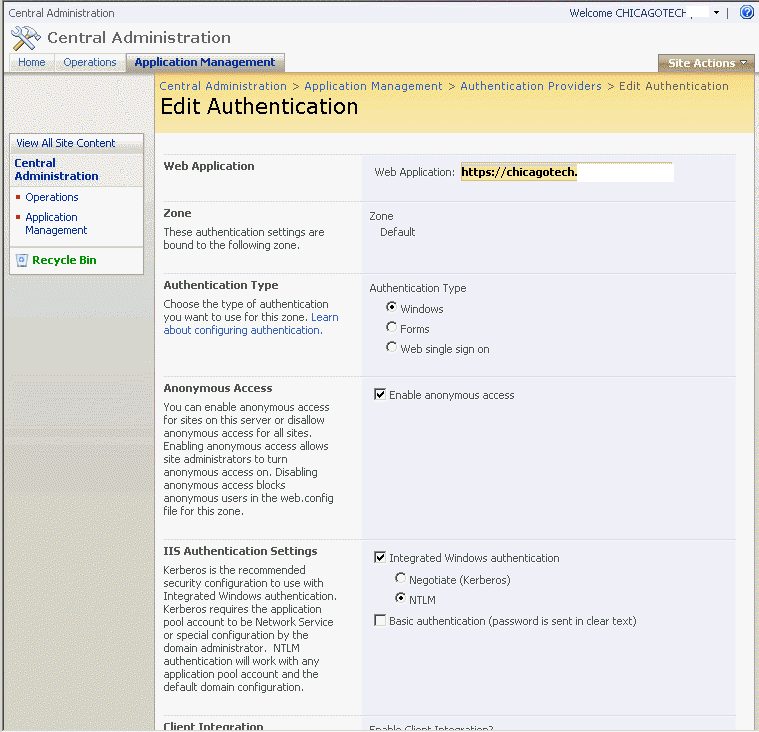
This article is based on SharePoint 2007. 1. Run Share Point Central Administration. 2. Navigate to Application Management>Authentication Providers>Edit Authentication. 3. Check Enable anonymous access and click OK to save it.
Post your questions, comments, feedbacks and suggestions Related Topics
|
|
|
This web is provided "AS IS" with no warranties.
Copyright © 2002-2018
ChicagoTech.net,
All rights reserved. Unauthorized reproduction forbidden.