|
|
|
|||
|
Home | Troubleshooting | Quick Setup | Cisco How to | Data Recovery | Forums | Blog | IT Exam Practice | Services | About Us | Chicagotech MVP | Search | Contact Us | |
|
How to add a user to access SharePoint
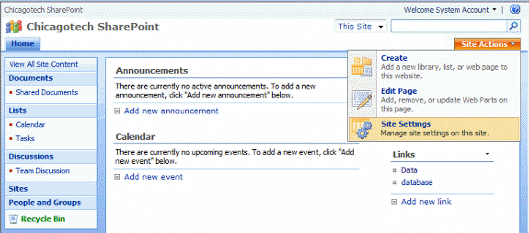
1. Logon SharePoint using a administrator account.
2. Click Site Actions in the right side.
3. Click Site Settings.
Post your questions, comments, feedbacks and suggestions Related Topics
Authentication to WSS site fails in Internet access
Can't access Microsoft #SSEE with error 26
Internet Explorer cannot display WSS or SharePoint
Received debug error when open Word stored in WSS
|
|
|
This web is provided "AS IS" with no warranties.
Copyright © 2002-2018
ChicagoTech.net,
All rights reserved. Unauthorized reproduction forbidden.