|
|
|
|||
|
Home | Troubleshooting | Quick Setup | Cisco How to | Data Recovery | Forums | Blog | IT Exam Practice | Services | About Us | Chicagotech MVP | Search | Contact Us | |
|
Move WSS content database to a different drive with SSEE using SQL Server Management Studio Express
1. Copy C:\WINDOWS\SYSMSI\SSEE\MSSQL.2005\MSSQL\Data to the drive you want to move to, for example G in our case.
2.Download Microsoft SQL Server Management Studio
Express:
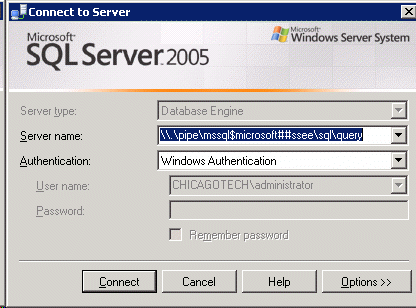
3. Run SQL Server Management Studio Express and select server name, for example MICROSOFT##SSEE.
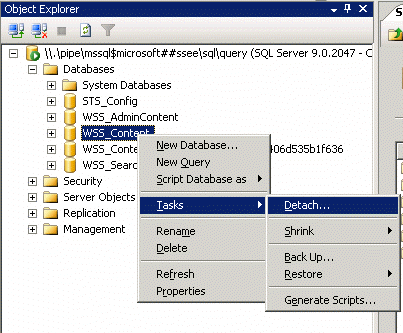
4. After connecting to the server, right click on the database we want to move and select Taks>Detach.
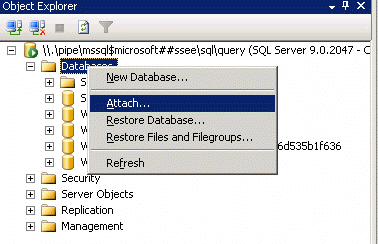
5. After detaching the current database, right click on Database and select Attache.
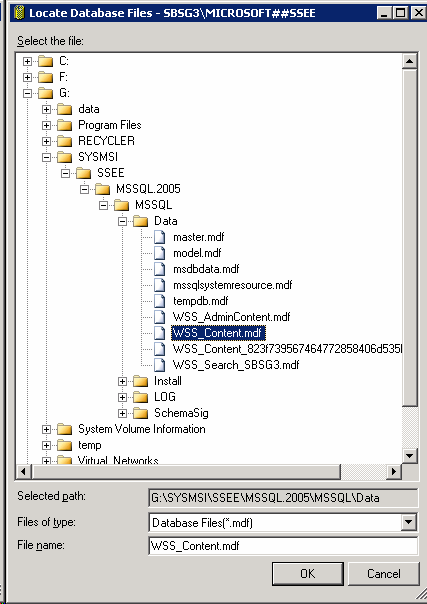
6. Click Add and navigate the data folder you copied before, in our case, it is G:\SYSMSI\SSEE\MSSQL.2005\MSSQL\Data. Click OK to attach the database.
Post your questions, comments, feedbacks and suggestions Related Topics Move WSS content database to a different drive with SSEE
Authentication to WSS site fails in Internet access
Can't access Microsoft #SSEE with error 26
Internet Explorer cannot display WSS or SharePoint
Received debug error when open Word stored in WSS
|
|
|
This web is provided "AS IS" with no warranties.
Copyright © 2002-2018
ChicagoTech.net,
All rights reserved. Unauthorized reproduction forbidden.