|
|
|
|||
|
Home | Troubleshooting | Quick Setup | Cisco How to | Data Recovery | Forums | Blog | IT Exam Practice | Services | About Us | Chicagotech MVP | Search | Contact Us | |
|
How to install Integration Services
on Hyper-V
The Integration Services are software packages that improve integration between the virtualization server and the virtual machine. The good example is that the NIC may not work after create the Virtual Machine until you install the Integration Services. Another example is he mouse can't move outside of the virtual machine window except you press Ctrl+Alt_Left Arrow keys.
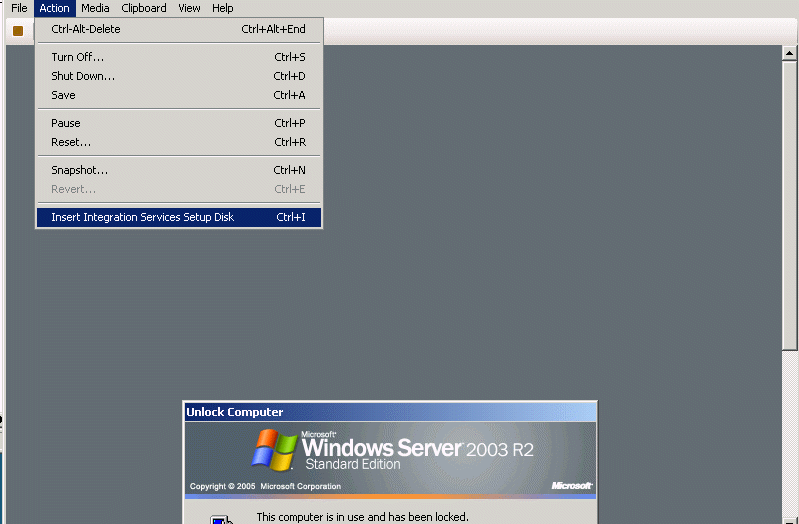
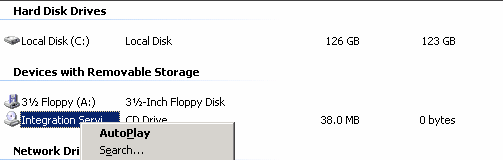
To install the Integration Services, from the Action menu of Virtual Machine Connection, click Insert Integration Services Setup Disk. If Autorun does not start the installation automatically, you can start it manually navigating to the CD drive. Right-clock on it, select AutoPlay.
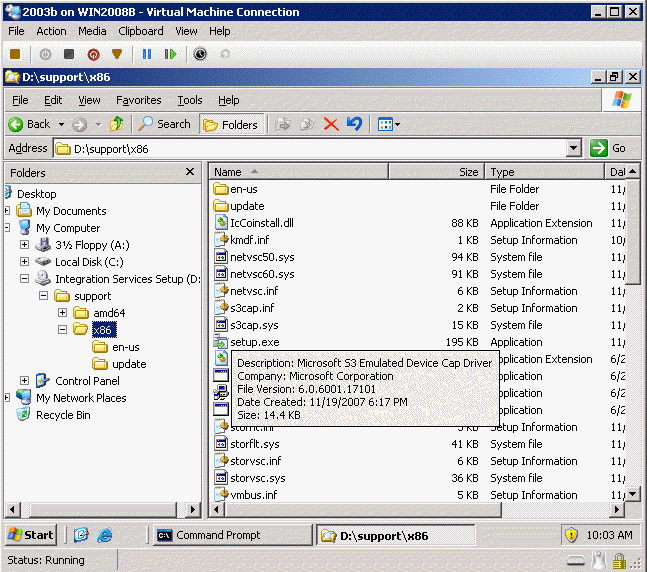
If the Insert Integration Services Setup Disk doesn't work, make sure you have Integration Services Setup captured in guest computer as showing below. You may be able to run the setup.exe from Integration Services Setup\support\x86.
If you don't have Integration Services Setup captured, check Media>DVD Drive, make sure you have vmguest.iso (Eject vmguest.iso). If not, you may need to reboot the guest server.
Post your questions, comments, feedbacks and suggestions Related Topics
Troubleshooting Windows Server 2008 |
|
|
This web is provided "AS IS" with no warranties.
Copyright © 2002-2018
ChicagoTech.net,
All rights reserved. Unauthorized reproduction forbidden.