|
|
|
|||
|
Home | Troubleshooting | Quick Setup | Cisco How to | Data Recovery | Forums | Blog | IT Exam Practice | Services | About Us | Chicagotech MVP | Search | Contact Us | |
|
How to setup Network Policy Server in Windows 2008
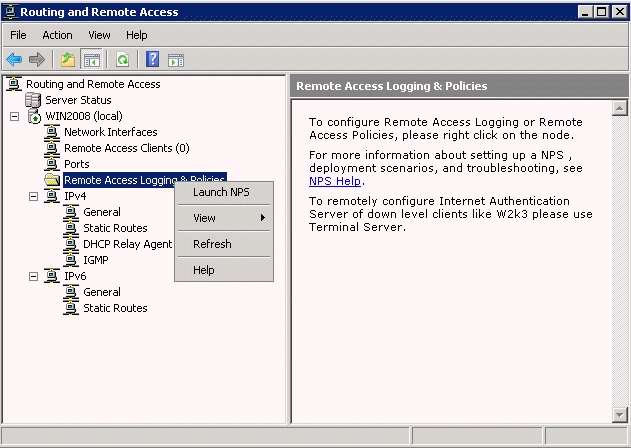
1. Open RRAS and right click on Remote Access Logging & Policy. 2. Select Launch NPS.
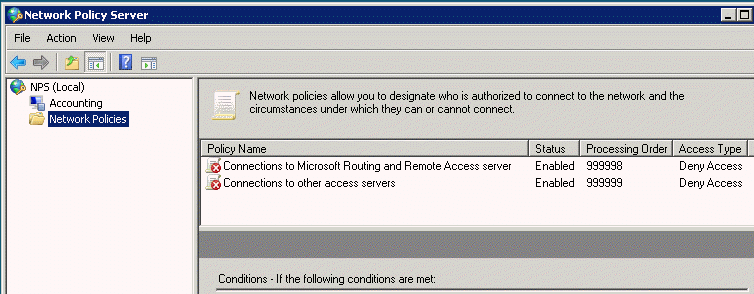
3. All default policies are disable by design. Double-click on Connections to Microsoft Routing and Remote Access server.
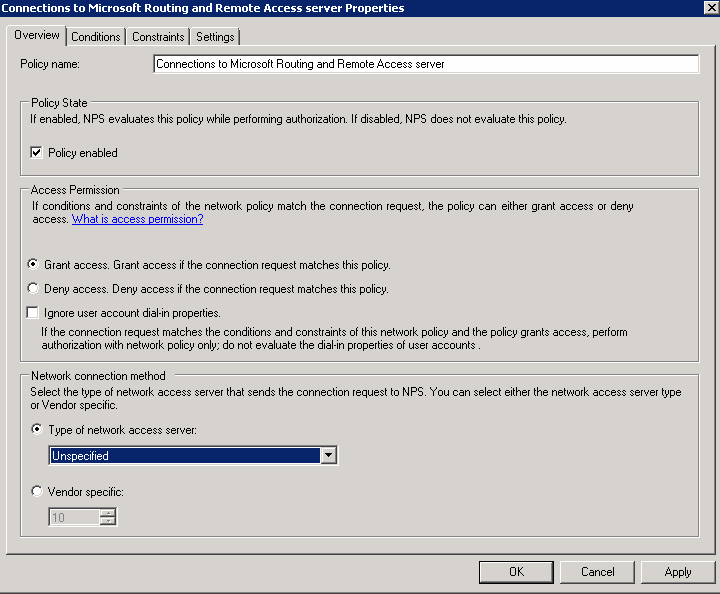
4. Check Grant access. Click OK to save the settings.
Post your questions, comments, feedbacks and suggestions Related Topics
|
|
|
This web is provided "AS IS" with no warranties.
Copyright © 2002-2018
ChicagoTech.net,
All rights reserved. Unauthorized reproduction forbidden.