|
VMware How to
How to access VMware
server using SSH
How to add a network adapter in VMware Guest
OS
How to add USB device to VMware VM
How to add number of vSwitch ports in VMware
4
How to check the status of VMware virtual
network adapter
How to change root password in vSphere
How to configure the speed and duplex on
VMware host network adapter
How to configure NIC teaming using the
Virtual Infrastructure Client
How to configure Pano Manager
on VMware
How to create Datacenter in VMware
VirtualCenter
How to create iSCSI storage in VMware ESX Server
How to Create VMware ESX Server templates
How to delete iSCSI storage in VMware
vCenter
How to display routing table in VMware host console
How to Enable SSH on ESX Server
How to enable and disable VMware
Maintenance Mode
How to import converted VM to VMware ESX
server
How to install Pano Manager on
VMware
How to install patch or update in VMware
How to Install VMware ESX
Server 3
How to install VMware Infrastructure Management
How to inventor or register a VM in VMware ESX
4
How to load custom RAID drive when installing XP
on VMware
How to move VM between two storages
How to move VMware VM using FastSCP
How to obtain diagnostic information for
VMware ESX Server
How to restart network in Vmware host
How to send Ctrl+Alt+Del in VMware vSphere
Client
How to use VMware Converter to create a
Virtual Machine
How to run Windows Safe Mode in VMware
How to Reboot or Shut Down an ESX/ESXi Host
How to use VMware
Converter to create a Virtual Machine
How to upload files or
folders to VMware using VMware infrastructure client
Understand VMware Definitions and products
Useful VMware command lines
What can
VMware vCenter Converter do
What is
VMware vCenter Converter
How to create iSCSI storage in VMware ESX Server
Before creating a iSCSI storage, create a volume in the
iSCSI SAN first. Please refer to this page:
How to create an EqualLogic SAN Volume for VMware storage
1. Login VI client.
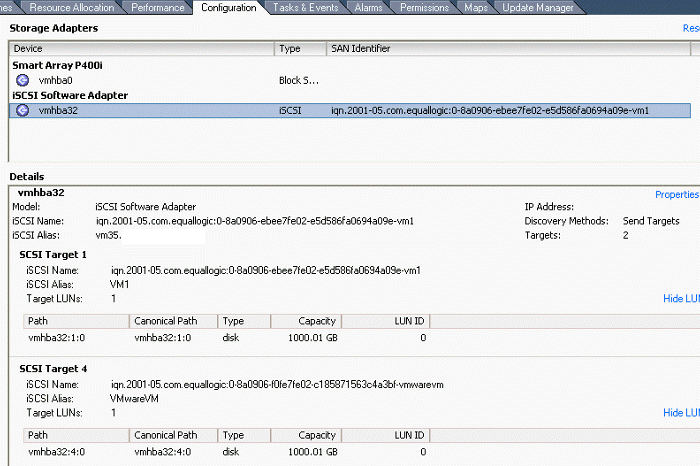
2. Click on Configuration tab.
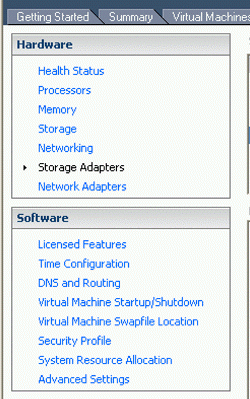
3. In the left panel, select Storage Adapter under
Hardware.

4. Click Rescan in the right. It will take a while to show
all iSCSI volumes in the Details.

5. Click Properties in the Details panel to iSCSI
Initiator properties.
Previous Next
Post your questions, comments, feedbacks and suggestions
Contact a consultant
Related Topics
|