Home | Troubleshooting |

FREE Tech Support
Ask your questions in

http://chicagotech.net/forum1.htm

 Cisco How to| Case Studies | Site Map | Forums| Windows Vista | Services  | Careers  | Contact Us| About Us     


How to disable/enable Vista File Sharing Wizard


Vista File Sharing Wizard is similar to XP Simple File Sharing. By default, File Sharing Wizard is enabled. To disable/re-enable it, please follow these steps.


1. Open Control Panel>Classic Viewer>Folder Options or Windows Explorer>Organize>Folder and Search Options..

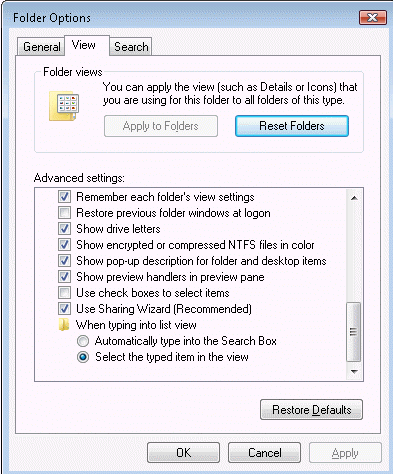
2. Click on the View tab.

4. Uncheck/check  the Use Sharing Wizard (Recommended) box.

Note: After disabling the File Sharing Wizard, the Share option under Sharing tab will also be grayed out.


Post your questions, comments, feedbacks and suggestions

Contact a consultant

Related Topics


Hit Counter   This web is provided "AS IS" with no warranties.
Copyright © 2002-2008 ChicagoTech.net, All rights reserved. Unauthorized reproduction forbidden.