Home | Troubleshooting |  Quick Setup  |  Cisco How to  |  MS-MVP  |  Wireless  |  Forums   | Site Map | Services  | Donations | Careers  | Search                          

Clearapps network inventory
software.


How to install the Administration Tools package in Windows 7

  1. Download and install the Administration Tools package from the Microsoft Web site (http://go.microsoft.com/fwlink/?LinkID=137379).
  2. Click Start, type Programs and select Programs and Features to run.
  3. In the Programs and Features area, click Turn Windows features on or off.
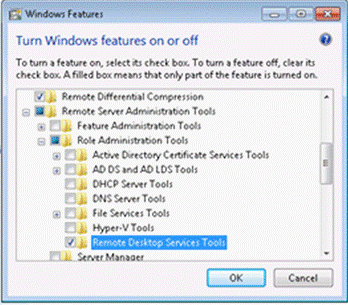
  4. In the Windows Features dialog box, expand Remote Server Administration Tools.
  5. Select the remote management tools that you want to install (for example Remote Desktop services Tools), and then click OK.


Post your questions, comments, feedbacks and suggestions

Contact a consultant

Related Topics


Your Ad Here

Hit Counter   This web is provided "AS IS" with no warranties.
Copyright © 2002-2012 ChicagoTech.net, All rights reserved. Unauthorized reproduction forbidden.