|
|
|
|||
|
Home | Troubleshooting | Quick Setup | Cisco How to | Data Recovery | Forums | Blog | IT Exam Practice | Services | About Us | Chicagotech MVP | Search | Contact Us | |
|
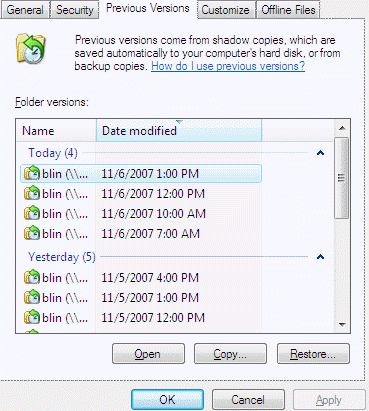
How to recover a deleted file or folder using Shadow Copy 1.On the workstation, Navigate to the folder in which the deleted file or folder had been stored. 2.Move the mouse in the folder. 3.Right-click the mouse and select Properties. 4. Select the Previous Versions tab. 5.Select the version of the folder that contains the file before it was deleted, and then click View. 6.Select the file that will be recovered (See figure 1). 6.Drag and drop, or cut and paste, the shadow copy to the desktop or folder on the end user’s local machine. Figure 1.
Post your questions, comments, feedbacks and suggestions Related Topics How to recover a deleted file using shadow copy
|
|
|
This web is provided "AS IS" with no warranties.
Copyright © 2002-2021
ChicagoTech.net,
All rights reserved. Unauthorized reproduction forbidden.