|
How to configure Netgear ProSafe VPN Client using Security Policy Editor
3/9
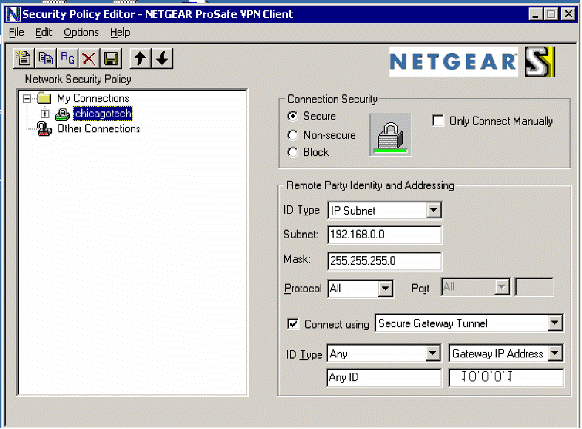
3. Click the ChicagoTech connection, the
right pane displays the connection properties.
- For "Connection
Security", choose Secure.
- Under "Remote
Party Identity and Addressing", choose
IP Subnet for ID Type.
- For "Subnet" and
"Mask", enter the remote LAN Subnet and Mask, in our case they are
192.168.0.0 and 255.255.255.0.
- Choose
All
for Protocol.
- Check
Connect using.
- Choose
Secure Gateway
tunnel.
- For "ID Type",
choose Any.
- Choose
Gateway IP Address
and enter the router's WAN IP, 10.0.0.1 in our case. Note: if you
specified local IPSec identifier as FQDN or DDNS name instead of WAN IP
Address, you will choose gateway Hostname.
Post your questions, comments, feedbacks and suggestions
Contact a consultant
Related Topics
How to setup VPN
between FVS318 and windows 2000
Parameters Recommended for FVS318 VPN
(Figure)
Configuring the Client-to-Gateway VPN Tunnel on
the FVS318v3 (Figure)
How to configure Windows IPSec
Difference of Tunnel Setting
between local to remote and remote to local
How to check the VPN status on
FVS318
Previous Page
Next Page
|
|
